Local merge queue
mergetrain
 mergetrain
A local merge queue for parallel LLM agents in Git worktrees. Test combined changes before an approved push.
A local merge queue for parallel LLM agents
mergetrain integrates committed branches from coding agents that use large language models (LLMs). The agents work in separate Git worktrees. The queue and runner run on your machine.
Each agent commits and enqueues its branch. One runner merges branches in queue order and tests the combined result in an isolated worktree. After explicit approval, it updates the configured Git refs in one atomic push.
Test parallel Claude Code sessions and Codex worktrees
Use it when parallel Claude Code sessions, Codex worktrees, or other coding agents produce branches that must be checked together before pushing.
Changes can pass tests on their own and fail after they are combined. The local Git merge queue runs your configured checks against that combined result. For a single agent on one branch, ordinary Git may be enough.
Start with batch
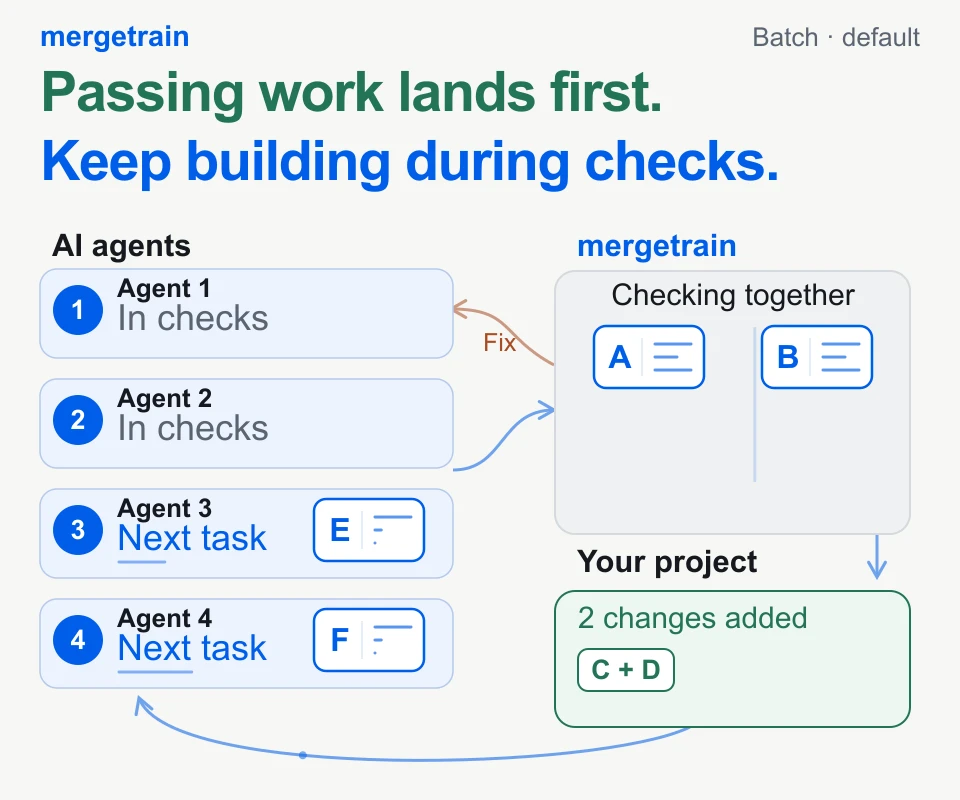
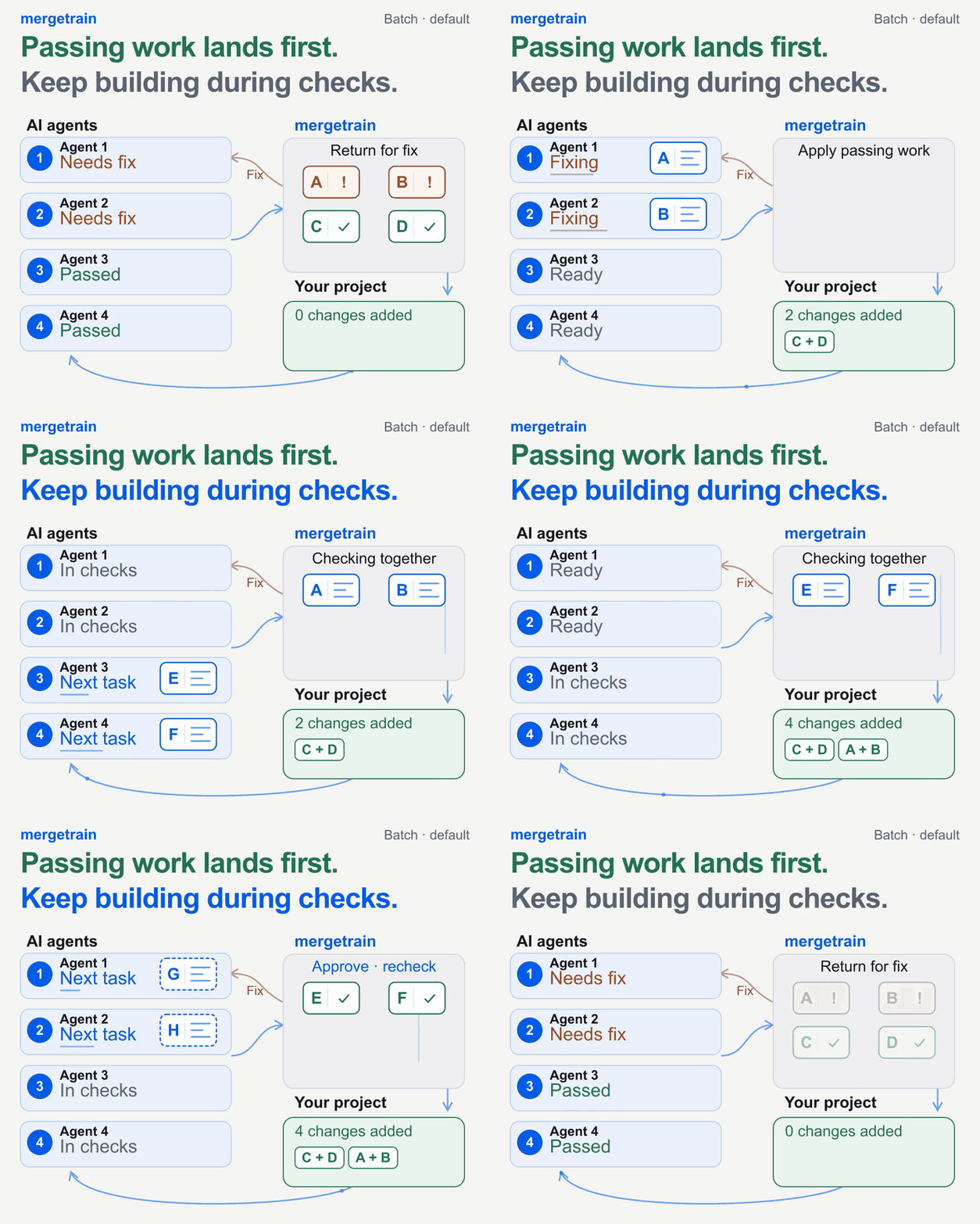
The GIF shows default batch mode: passing work lands first. Work that needs a fix returns to its agent. Passing work can land while that repair continues.
Use batch for everyday parallel work. It checks waiting submissions together. It does not wait for every agent to finish.
For example, A fixes login, B adds search filters, and C updates the admin screen. If B fails on its own, mergetrain can isolate it and check A+C. A+C can land if those checks pass. B's agent repairs its work; the retry joins the back of the queue.
When ordered helps
Use ordered when each change needs a separate landing and result. For example, compiler agents optimize constants (A), loops (B), and register allocation (C). Measure each change against the previous landed result.
A lands first. If B fails, C waits. B's repair keeps its place before C, including after a runner restart.
Agents can keep building in both modes. Ordered holds later landings and runs checks per submission. Both keep approval and the default pre-push recheck.
Ordered is available in 3.6.0 and newer. Keep batch for everyday parallel work. Choose ordered when each submission must land in sequence. See the work examples and upgrade procedure.
Built for local workflows
- A Git worktree merge queue for committed branches
- Configurable checks on the combined result
- Explicit approval for atomic Git pushes
- Works with different coding agents and ordinary Git workflows
mergetrain is an owner-operated utility, not a hosted CI service. Git permissions and the checks you configure remain part of the setup.
Recover an interrupted Git push
If a push is interrupted, a missing response does not prove that it failed. mergetrain records push evidence. Recovery checks the remote Git refs before choosing a next action. See the failure and recovery guide.
Get started
Passing work lands first. Keep building during checks. The 14-second loop shows these two steps with the same four agents. New work is labeled Next task in each agent’s lane. Applied changes stay in the project. Use the GIF link if video playback is unavailable.
Try the basic CLI demo with uvx mergetrain demo. The extended workflow recording includes repair, two overlaps and three approved deployments with the default recheck. A fresh clone of the final local remote passes six tests.
The capture scripts agent-authored changes and operator approvals in a disposable repository. It does not launch an AI service. Two fixture gate waits make the overlaps reproducible: E/F commits during A/B validation, then G/H drafts start during E/F validation. G/H refresh onto the final result without losing their edits; I/J start there too. All four drafts remain unsubmitted. The four lanes represent agent roles, and letters identify work. The 14-second animation repeats this recorded window. Inspect the commands and results.
Installation instructions are in the GitHub README. The package is also available on PyPI.
Released under the MIT license.